Multiplayer modeinstructors branch
Git instructors: track your learners, keep your proof
Do you teach Git in a school, a bootcamp or a training organization? Your learners practice Git in GitQuest, and the instructor dashboard shows you who did what, with Qualiopi reports ready in one click. Designed by a hands-on instructor.
- No credit card
- Premium for your learners
- From €29 excl. VAT a month
Web Dev 2026 cohort · 12 learners
PDF report| Learner | Ch. 1 | Ch. 2 | Ch. 3 | Inv. 1 | Inv. 2 | Time |
|---|---|---|---|---|---|---|
| Camille R. | passed | passed | passed | passed | in progress | 4 h 10 |
| Idriss B. | passed | passed | in progress | try again | not started | 2 h 45 |
| Lou M. | passed | in progress | not started | not started | not started | 1 h 05 |
| Sacha T. | passed | passed | passed | passed | passed | 5 h 30 |
Remote learning must now be proven
For training organizations certified Qualiopi (the French quality certification), the new indicator 19 requires checking that learners really follow remote modules. Download the free kit: the indicators involved, audit day and ready-to-paste texts.
The realitywhat every instructor knows
The reality every instructor knows.
Git is in every curriculum, but it is often the most frustrating blocker for learners. We know because we live it every day.
Learners disengage
Git often comes early in the program, when learners are discovering the command line. The accumulation of commands, error messages in English and abstract concepts creates a wall.
Time is scarce
Between languages, frameworks and projects, the curriculum is already packed. Git is often covered in a few hours, when weeks of regular practice would be needed.
Practice is lacking
You can explain branches on a whiteboard, but until the learner has resolved a real merge conflict, the concept remains theoretical. What is missing is a safe, guided practice space.
Instructor dashboardgit status
Tracking and proof, without a spreadsheet.
Today, you rebuild by hand who did what and for how long. The instructor dashboard does it for you, based on what your learners actually do in GitQuest.
Good to know: the dashboard interface is currently in French. The app and the web games your learners use are available in English.
Cohorts and curriculum
Build each cohort's curriculum with investigations, Academy chapters and ready-to-use quiz packs. Open and close exercises whenever you want.
Submissions and feedback
See each learner's commands, compare them with the reference solution and send an exercise back as “to redo” with your comment.
Honest active time
The counter stops after inactivity. It is never called “attendance”: an inflated number turns against you during an audit.
Qualiopi reports
PDF and XLSX reports in one click, stored and timestamped, with the same numbers as the screen. With your logo from the Solo plan.
Premium for your learners
During the cohort, your learners get premium in the app and can also play on the web, from a computer. Without paying anything.
Transparency for the learner
Each learner accepts what is recorded before being tracked, and sees everything you see about their activity.
Getting startedgit log --oneline
Your first cohort in 3 steps.
- commit 1
Create the cohort
Give it a name and dates, then choose the investigations, chapters and packs for its curriculum.
- commit 2
Invite your learners
Share the cohort code. They enter it in the app or on the web, and switch to premium.
- commit 3
Track and export
Follow the cohort grid, give your feedback and download the report for your audit or your funder.
Your learners already find it
GitQuest is the app people find when they search the stores to learn Git.
| Search | Country | Rank |
|---|---|---|
| apprendre git | US, France, UK | #1 |
| learn git | US, France, UK | #3 |
| apprendre git (Google Play) | France | #4 |
- 57Academy sign-ups this quarter, 100% opt-in
- 11.7kApp Store impressions this quarter (+185%)
- 433App Store product page views this quarter (+73%)
- 152Android devices with the app installed (+16% this quarter)
Pricingexcl. VAT
Instructor dashboard pricing.
Paid by your organization, never by your learners. Every paid plan includes the Qualiopi reports and premium for your cohorts. Prices in euros.
Trial
To try it before you buy
€0
30 days, no credit card
- 1 cohort, up to 10 learners
- All features
- Reports marked “Trial”
Cohort pass
For 1 to 3 sessions a year
€59
excl. VAT per cohort, valid 90 days
- 1 cohort, up to 20 learners
- Premium app and web game for the cohort
- Qualiopi reports in PDF and XLSX
- No subscription
- Most chosen
Solo
For the independent instructor
€29
excl. VAT per month, or €290 excl. VAT per year
- Unlimited cohorts
- Up to 40 active learners
- Qualiopi reports with your logo
- No commitment
Organization
For a training organization, a bootcamp, a school
€89
excl. VAT per month, or €890 excl. VAT per year
- 3 instructors included, then €15 excl. VAT per month each
- Up to 150 active learners
- Team, roles and cohort transfers
- Qualiopi reports with your logo
Institution
Public school, large organization or network with more than 150 learners: unlimited instructors, purchase orders, administrative mandates and a signed data processing agreement. On quote, starting at €1,900 excl. VAT per year.
Request a quoteDiscounts
- Yearly: 2 months free
- Non-profits, social economy, back-to-work programs, training for jobseekers: 30% off with proof
- Founders: price locked for life for the first 5 subscribing organizations
Prices exclude VAT. Reaching a quota never cuts off a running cohort. The 30-day trial starts as soon as you create your dashboard, with no credit card.
In classa complement, not a replacement
How to use GitQuest in your courses.
GitQuest is designed as a complement to your courses, not a replacement. It is the missing tool for your learners to practice Git regularly. GitQuest integrates easily into your existing pedagogy. Here are some concrete suggestions.
- Before class
Set the foundation
Ask your learners to complete the investigations on the basics (init, add, commit) before your Git lesson. They arrive with concrete knowledge and your course can go further.
- After class
Reinforce what was learned
After a lesson on branches and merging, direct your learners to the corresponding investigations. They practice independently and come back with relevant questions.
- Ongoing
Daily challenges
Encourage your learners to maintain a streak with the daily challenges. 5 minutes a day is worth more than one hour of Git lecture once a month.
- During projects
Support during projects
When a learner is stuck on a Git conflict during a project, instead of solving it for them, point them to the corresponding investigation. They learn to solve it themselves.
What GitQuest brings to your training
- Guided practiceLearners train on realistic scenarios with immediate feedback. No more copy-pasting from Stack Overflow.
- Accessible on mobileNo computer needed to practice. Learners can train during their commute, at home or between classes.
- Motivation through gamingXP, levels, streaks and investigations maintain engagement over time. No more giving up after the first Git error.
- Structured progressionFrom the first git init to interactive rebase, the progression is designed to follow the pace of professional training.
- Built-in accessibilityKeyboard navigation, adapted contrasts, color blind mode, dyslexia font. Because inclusion applies to digital tools too.
- RNCP alignedThe skills covered match the requirements of RNCP level 5, 6 and 7 certifications in web and software development.
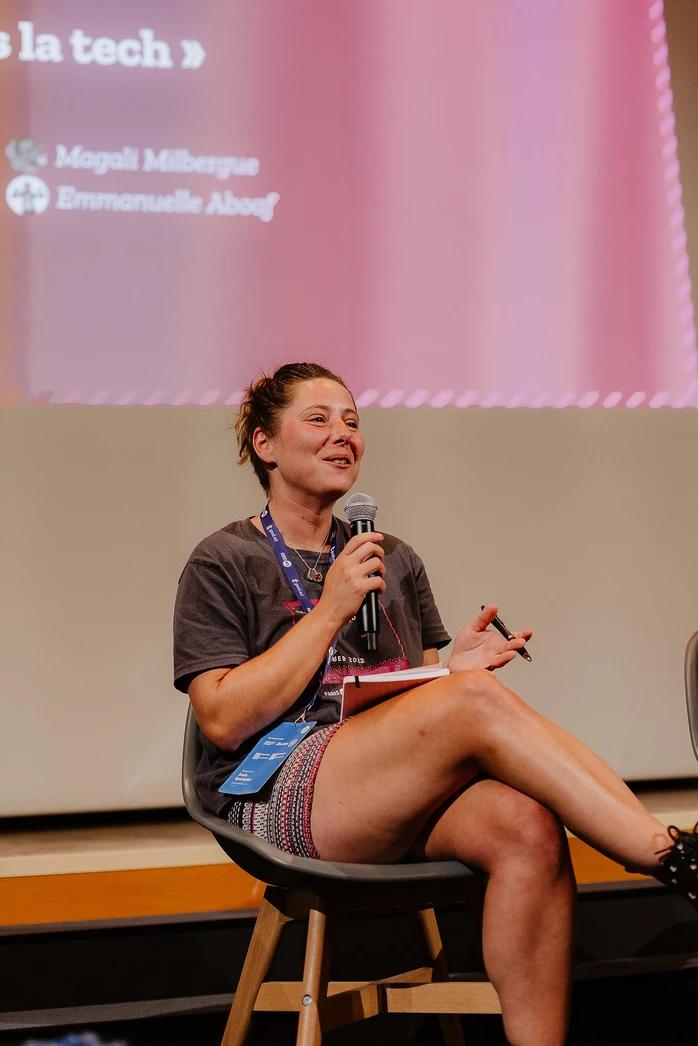
Built by an instructor
A project born from experience
« Every feature of the instructor dashboard starts from a real classroom need: tracking a cohort without a spreadsheet, giving feedback on submissions and preparing an audit with honest numbers. »
GitQuest is not yet another Git tutorial. It's a tool created by someone who trains developers in career transitions and apprenticeships every day.
I'm Anaïs, a web developer and head of education. After years of helping learners with Git, often the number one stumbling block, I created GitQuest to make learning hands-on, progressive and motivating.
Learn more about my background (new window)Frequently asked questions
A tool designed by an instructor, for instructors
Your learners practice Git, you keep the proof. 30-day trial, no credit card.
A question before you start?
Are you an instructor, training manager or school director? Write to us: we answer in person, and your real-world feedback shapes the dashboard.
Contact usInstructor dashboard · 30-day trial, no credit card
Try it free