The best games to learn Git, tested
Git games, tested: Learn Git Branching, Oh My Git!, Githug, Git Exercises, Visualizing Git and GitQuest compared on price, real or simulated Git, and mobile.
By Anaïs Sparesotto (opens in a new window)Published 11 min read
The short answer: start with Learn Git Branching, the most complete free Git game you can play in a browser, to understand branches without installing anything. Then build real muscle memory in your own terminal with Githug and Git Exercises; and if you'd rather practice on your phone, that's where GitQuest fits in.
This article compares games from all over. To play GitQuest's own games right away, head to the online Git game page or see how to learn Git by playing with the app.
Full disclosure: GitQuest is my own project. I held it to the same criteria as the other five, limits included. Every tool here was opened or installed on October 19, 2026 for this comparison, and each one is linked below: they're all free to start, so go try them.
The comparison at a glance
Six criteria, the same for every game: price, where you play, what kind of Git you use (the real thing or a simulation), level, languages, and whether it works on a phone.
| Game | Price | Where you play | Git | Level | Languages | On a phone |
|---|---|---|---|---|---|---|
| Learn Git Branching (opens in a new window) | Free, open source | Browser | Simulated | Beginner to advanced | About 30 | No |
| Oh My Git! (opens in a new window) | Free, open source | Download (Windows, macOS, Linux) | Real Git | Beginner to intermediate | English | No |
| Githug (opens in a new window) | Free, open source | Terminal, needs Ruby | Real Git | Beginner to advanced | English | No |
| Git Exercises (opens in a new window) | Free, open source | Terminal, needs Git | Real Git | Intermediate | English | No |
| Visualizing Git (opens in a new window) | Free, open source | Browser | Simulated | Beginner to intermediate | English | No |
| GitQuest | Free with ads, optional Premium | iOS and Android app, website | Simulated in the app, real Git in the web course | Beginner to intermediate | 9 in the app, English and French on the web | Yes |
All six are online and working as of the test date. Two caveats, though: Oh My Git! is barely maintained anymore, and Visualizing Git's code hasn't changed since 2019 (more on both below).
Simulated or real Git: why it matters
One difference matters more than any other when you pick a Git game:
- A simulated game recreates Git inside a web page or an app. Nothing to install, nothing to break, and you often see the history being drawn as you type. The trade-off: it only knows some commands and options, and its messages don't always match real Git.
- A real-Git game has you type commands in a terminal, on an actual repository. You read the real error messages, the ones you'll meet at work. The trade-off: you need Git installed (sometimes another tool too), and there's no diagram to show you what just happened.
They work best together: simulation to understand, real Git to build reflexes. If you've never opened a terminal, our guide to learning Git in the terminal will help you take that first step.
Learn Git Branching: the most complete browser game
Learn Git Branching (opens in a new window) draws your history as a tree: every commit is a bubble, every branch a label. You type a command on the left and the tree animates on the right. Each level shows you the tree you need to end up with, and you work out the commands that get you there.
- 36 levels across two tabs: local work (commits, branches, merge, rebase, detached HEAD, cherry-pick, interactive rebase, tags), then working with a remote (clone, fetch, pull, push, tracking branches).
- Strengths: no install, no account, progress saved in your browser (and exportable), an interface translated into about 30 languages, a "Solution" button when you're stuck, and a sandbox to experiment freely. It's one of the clearest ways to see what
mergeandrebasedo to your history. - Limits: Git is simulated and files have no content, so you never resolve a merge conflict. The newest levels cover the staging area, but the game is mostly about commits and branches. On a phone, the site tells you upfront that it can't receive input and suggests switching to a desktop.
- Best for: anyone starting out, and anyone who never quite understood rebase.
Oh My Git!: an actual video game, with cards
Oh My Git! (opens in a new window) is a download for Windows, macOS and Linux. bleeptrack and blinry built it in 2020 and 2021 with funding from the Prototype Fund, a German public grant program. It's the most "video game" of the bunch: you sign up for a time travel school, and the inside of your repository is drawn live with every action.
- About forty levels, from your very first commits to merge conflicts, rebase,
git bisect, stash and tags, plus three sandboxes. - Strengths: beginners play cards. Each card is a command with an icon and a short description, so you don't need to know the syntax. When you're ready, a built-in terminal accepts any command, run by real Git. The game also puts a strong focus on collaboration with remotes.
- Limits: you have to install it (no browser version, no mobile), and it's English only. More importantly, its creators state on GitHub that the project is in "low-maintenance mode", so fixes are slow to land. The latest release is 0.6.5.
- Best for: people who learn better from a real game than from exercises.
Githug: the terminal classic
Githug (opens in a new window) runs straight in your terminal, on real Git. Install it with gem install githug (you need Ruby), then run githug: it creates a git_hug folder and gives you your first task.
githug********************************************************************************* Githug *********************************************************************************No githug directory found, do you wish to create one? [yn] yWelcome to Githug! Name: initLevel: 1Difficulty: * A new directory, `git_hug`, has been created; initialize an empty repository in it.You solve each level with real Git commands, here git init inside git_hug, then run githug again to check your answer. It replies Congratulations, you have solved the level! and moves you on.
- 56 levels in the published release (0.5.1, August 2024), from
git inittogit rebase,git bisect, submodules and conflict resolution. A 57th level, ongit clean, landed on GitHub in September 2026. - Strengths: everything is real: the repository, the commands, the error messages.
githug hintgives you a clue,githug resetrestarts the level,githug levelslists them all. Tested with Git 2.54: it still works. - Limits: you need Ruby before you can play. There are no diagrams and no lessons: a one-line task, a hint, and the documentation is yours to dig through. English only.
- Best for: people who know the basics and want to practice them for real, with the docs open in another tab.
Git Exercises: real-world problems, checked by a server
Git Exercises (opens in a new window) was created by Wojciech Frącz and Jacek Dajda at AGH University in Kraków. You clone a repository (git clone https://gitexercises.fracz.com/git/exercises.git), each exercise lives on its own branch, and when you think you're done, git verify sends your solution to the server, which checks it and answers right in your terminal.
cd exercisesgit config user.name "Sam"git config user.email "sam@example.com"./configure.shOKgit startPreparing the exercise environment, hold on...Exercise master started!Read the README.md for instructions or view them in browser:http://gitexercises.fracz.com/e/master./configure.sh adds the git start, git verify and git exercises aliases to this repository only; your global Git configuration stays untouched.
- 23 exercises drawn from everyday work: fix a typo in an old commit, split a commit in two, resolve a conflict, find a lost commit, track down the commit that introduced a bug, stash your work when your boss walks in with an urgent fix.
- Strengths: real Git and concrete problems, the kind you hit on a team. No account: your name and email (it doesn't have to be valid) only identify your solutions. The project is still alive: the home page lists solutions submitted in the last few minutes.
- Limits: it's not for day one, and the site says so: exercises assume you can already commit and know what the working and staging areas are. You need Git installed, an internet connection to verify, and English.
- Best for: the step after Githug or a first course, to go from basics to real situations.
Visualizing Git: a sandbox rather than a game
Visualizing Git (opens in a new window) has no levels and no goals: it's a playground. Type a command and the commit graph redraws. You can start from six scenarios (local only, with a remote, upstream changes, rewritten remote history, revert, cherry-pick), and it understands about fifteen commands, from commit to rebase, reset, reflog and push.
- Strengths: great for a demo, in class or pairing at one screen.
undoandredolet you replay the same move, and there's a presenter mode for projecting. - Limits: it's not a game, nothing guides you. The code hasn't changed since January 2019, the layout doesn't fit a phone screen, and during the test the page sometimes stayed blank on load (a script loading in the wrong order): reload it or try another browser if that happens. English only.
- Best for: people who've met a concept and want to watch it play out, and instructors.
GitQuest: investigations on mobile, a course on the web
One more time: this one is mine. GitQuest comes in two forms.
- The iOS and Android app: 69 investigations (a commit went missing, a branch got deleted, a merge went wrong) that you solve by typing commands in a simulated terminal. Around them: a daily challenge, quizzes, lives, XP and streaks to bring you back every day, and a certification. The app is available in 9 languages.
- The website: a free Git course in 5 chapters (about 5.5 hours) where you practice on your own computer with real Git, plus two no-account mini-games, Git Hangman and the complete-the-command game.
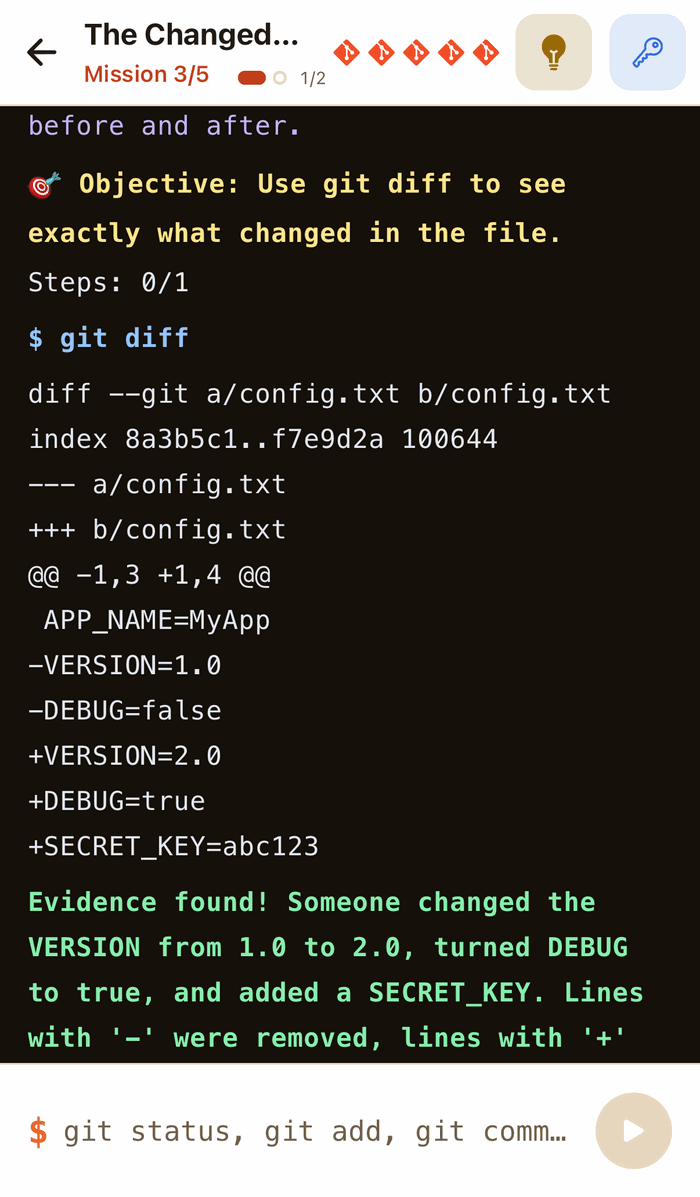
My take, with the same eye as for the others:
- Strengths: it's the only one of the six built for phones, in short sessions. Every investigation gives you a reason to type each command, and investigations are sorted into three difficulty levels.
- Limits: the app's terminal is a simulation. It understands part of Git, not all of it, and doesn't replace practice on a real repository. Investigations can't be played on the web, only in the app. The free version shows ads, and its lives (5 at most) sometimes force a break; the Premium subscription makes lives come back faster, doubles your XP and gives direct access to solutions. And the web course is rated 3.6/5 from 40 reviews at the time of testing, a score shown as-is on its page.
- Best for: beginners who want to practice a few minutes a day on their phone, including in a language other than English.
Which Git game should you pick?
- You're a complete beginner: Learn Git Branching on a computer to understand commits and branches, or GitQuest if you prefer short sessions on your phone.
- You know the basics and want a real terminal: Githug, then Git Exercises.
- You want a real game with a story: Oh My Git!
- You're preparing a demo or a class: Visualizing Git to show, Learn Git Branching to let people practice.
None of these games is enough on its own. My advice: combine two of them, one simulated to see what's happening and one on real Git to build reflexes, then move on to a real project. To learn why playing helps you remember, our page on learning Git by playing explains the approach.
Frequently asked questions
What is the best game to learn Git?
For beginners on a computer, Learn Git Branching: free, no install, and the clearest way to understand branches. To practice on real Git afterwards, Githug, then Git Exercises. On a phone, GitQuest, which is the author's own project.
Are there free games to learn Git?
Yes, all six in this comparison can be played for free. Learn Git Branching, Oh My Git!, Githug, Git Exercises and Visualizing Git are free and open source. GitQuest is free with ads, with an optional Premium subscription.
Can you learn Git on your phone?
Of these six, only GitQuest is built for it: its iOS and Android app offers investigations in a simulated terminal. Learn Git Branching shows a message on mobile asking you to switch to a desktop, and the others run in a terminal or install on a computer.
Do I need to install Git to play?
Not for Learn Git Branching, Visualizing Git or the GitQuest app, which simulate Git. Oh My Git! installs like any game. Githug and Git Exercises use the Git installed on your machine, and Githug also needs Ruby.
Is Learn Git Branching available in other languages?
Yes. The interface and levels are translated into about 30 languages, including Spanish, Portuguese, French, German, Japanese, Korean and Chinese. Pick one with the language button at the bottom right of the screen.
Is a game enough to master Git?
No, but it's a good start. Games teach you the commands and how Git thinks; you still need to apply them to a real project, with a remote and other people. A structured course, like GitQuest's free Git course, bridges the two.
From reading to practice
Type these commands for real in the GitQuest Academy simulated terminal: free, nothing to install, with a certificate at the end.
Keep learning
- Git gameThe GitQuest game: investigations, lives, XP, levels and daily challenges.
- Learn Git by playingThe gamified method behind GitQuest.
- GitQuest Academy: Getting Started with GitFree course, about 5.5 hours in 5 chapters for beginners: install and set up Git, track and save changes, branches, merges and conflicts. Every command is explained step by step, with mini-exercises and quizzes, then a final certification (5 investigations in a simulated terminal and a 20-question exam) and a certificate. Chapter 1 is open; chapters 2 to 5 only ask for an email.
- Git hangmanFree browser game: guess Git commands and terms letter by letter.